
Azure Front Door AiTM Phishing
We see new phishing toolkits and infrastructures all the time. Most of them are following the same patterns and are easy to spot. But, just a couple of weeks ago, during one of the investigations in Lab539 we detected something unusual - phishing infrastructure, set up to perform Adversary in The Middle (AiTM) attacks, hiding behind Microsoft’s Azure Front Door service.
At first glance this looks like a legitimate websites hosted on a Microsoft owned domain, a redirection chain containing all kinds of security focused websites, and trusted infrastructure. However, it turned out that it was a very well crafted AiTM campaign using some new and clever techniques to stay hidden from automated detection systems, non-technical targeted users, and investigators.
After some time digging deeper we uncovered some specific organisations being targeted. Those included The World Food Programme, UNICEF, major Swiss newspapers, and even some state.gov email addresses (U.S. Department of State).
Using Microsoft’s Azure Front Door reverse proxy to host phishing content, use of hashes in redirection chains, various encryption techniques, and strong obfuscation methods makes this one of the most advanced currently active phishing campaigns.
So first of all, what is Azure Front Door?
Simply, Azure Front Door is a cloud-based reverse proxy from Microsoft Azure. The initial purpose of it is load balancing, CDN capabilities, security, routing, and other. This has some similarities to Cloudflare’s workers.dev which has been used by adversaries to run phishing campaigns for quite some time, but azurefd.net doesn’t have serverless execution, it acts as a traffic manager so attackers need a backend.
Currently, we have detected 2 infrastructures that use Azure Front Door. We, imaginatively, call these Infrastructure 1 and Infrastructure 2. They have some differences but our analysis suggests, with a high level of confidence they are derived from the same codebase. The contents of the phishing page are exactly the same, the difference is in redirection methods and level of obfuscation.
Infrastructure 1
Concept
Infrastructure 1 is generally more obfuscated and much harder to block. Usually it uses 6-7 redirections before landing on the phishing page, and because of clever use of hashes in the link, the user won’t be able to access the final URL unless they go through all of the redirections from the start (more detailed explanation of that later).
Usually the redirection chain starts with a previously legit website that is bought by attackers or even compromised (the idea is to have a domain with historically legit-looking certificates). In this specific case the first website is ritba[.]org. This website gives us a hash that is stored in the URL bar and is used for client-side calculations only. User gets redirected through 1-2 telemetry collecting websites like: sophos.com, awstrack.me, secure-web.cisco.com, googleads.g.doubleclick.com, sendgrid.net, also some link shortening services like rb.gy and others. Those websites don’t have access to the hash.
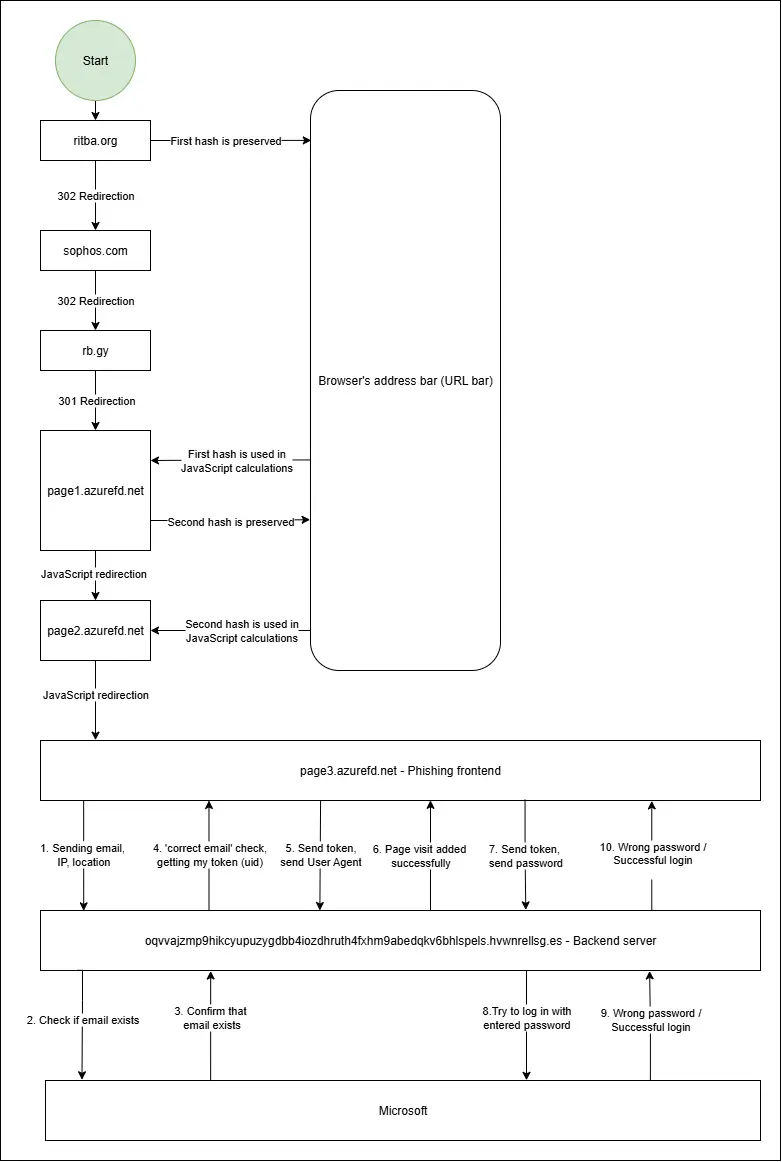
After those 3-4 redirections we land on the first AzureFD page (to make it simple I will just call them page{number of the page}.azurefd) - page1.azurefd decodes the hash passed from the ritba[.]org and redirects us to page2.azurefd with a new hash. page2.azurefd has another, completely different decryption formula that redirects us to the final page3.azurefd phishing webpage. Diagram of infrastructure 1:
Redirections
The adversaries have created a clever system that uses hashes to ensure that the entire redirection chain was followed. First website - ritba[.]org gives us a hash, which is part of the URL fragment. It stays in the URL bar of your browser until it gets any status code other than 3xx(redirections ends) or if JavaScript was used. I have selected it with yellow (Some part of the hash is blurred, because after decoding, it will contain the email address of the targeted organisation).

The Sophos redirection acts as a security gateway, most likely to block bots. Although the hash appears in the URL, it is never sent to Sophos or any other website’s servers. Instead, it remains in the browser’s address bar and is used for client-side operations. Azurefd websites used for redirection can access the hash, but only when JavaScript specifically requests it. Example of JS requesting the hash:
hash = window.location.hash.substring(1)page1.azurefd.net
After getting redirected through ritba -> Sophos -> rb.gy we finally get to the first AzureFD page. Whole link:
https://eg89743874397893498934-d8h0gph9fkc4byh4.z03.azurefd.netThis page responded with 200 status code and contains a JavaScript algorithm that decrypts the hashed link. At this stage, the decryption is not very obfuscated in terms of code readability, but still follows a complicated chain of steps.
- First, the code checks if a hash exists. For simplicity let’s say the hash is #1a2b3c
- Then it splits the hash in 2 character chunks - [‘1a’, ‘2b’, ‘3c’]
- The list is reversed - [‘3c’, ‘2b’, ‘1a’]
- Each chunk is converted from base36 to its decimal value: [‘120’, ‘83’, ‘46’]
- Then it performs its decryption formula which looks like the following:
chunk = (chunk - i) / 2 - KeyDigit.
Where ‘i’ is the index of the chunk. KeyDigit is a list of numbers - [‘8’, ‘7’, ‘4’, ‘2’] that are used one by one. So the formulas for each chunk would look like:
3b = (120 - 0) / 2 - 8
2b = (83 - 1) / 2 - 7
1a = (46 - 2) /2 -4
After all the numbers from KeyDigit are used it cycles back to the start again: 8 - 7 - 4 - 2 - 8 - 7 - 4 - 2 - 8. Once this process is completed we simply convert those decimal values into letters.
So after decrypting, we get the next url with a new hash:

page2.azurefd.net
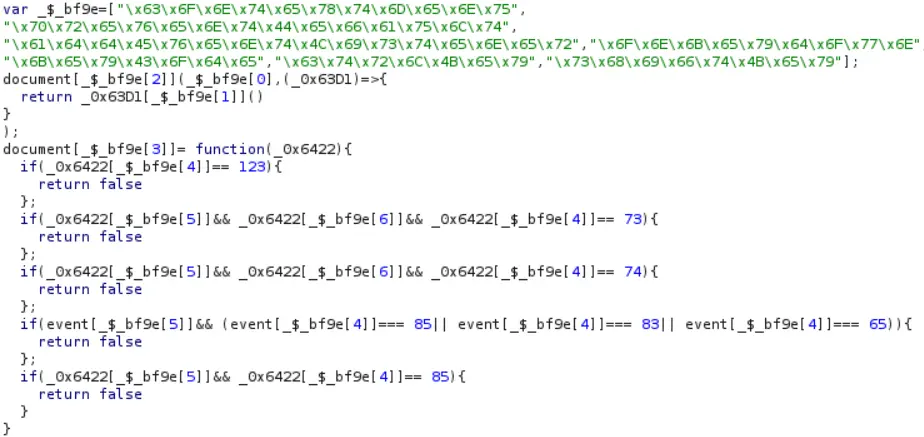
https://7843667324672387872332-gadyc6gmehd3cqew.z01.azurefd.netThis is the last website before arriving at the phishing page. Although its purpose is to redirect you to the next URL (same as the previous page), it is more obfuscated and uses a different decryption algorithm. This is the first page protected against web-scrapping, it blocks anything that may be used by investigators, including DevTools, Console, Page Source viewing, right-click in general, certain User Agents, Burp, and a lot more. Variable names are random, and some parts of the code are stored as hex-encoded strings in the list. Whenever needed, those strings are used from the list directly. For example this piece of code is blocking right-click, F12, Ctrl + Shift + I, Ctrl + Shift + J, Ctrl + U, Ctrl + S, Ctrl + A:
Hash decryption on this page follows the next process:
- Base64 decode string
- Each character is turned into %xx hex code
- decodeURIComponent() function turns it to string
- Then it takes each character, converts it to char code and subtract one from its char code number. For example: Letter ‘S’ = 83, 83 - 1 = 82, 82 = ‘R’.
- Reverse the string
- URI decode it again
- Check if the link is valid, and redirect to the final phishing page.
In this instance, after decoding we get the following HTML/JavaScript returned:
<script src="https://s00983254234564356-ftd6bjcbamf6ggeg.z03.azurefd.net/"></script>
<script lang="javascript">
    const reloadUsingQuery = () => {
        window.location.search = "example@example539.com";
    }
    window.onload = reloadUsingQuery;
</script>
We can see the final phishing URL as well as the target - example@example539.com (obviously just an example email!). This email will be added to the link as a parameter after ‘?’ character. The link we got points us to the actual phishing page.
Phishing Page
Obfuscation
The final phishing page is intentionally obfuscated in order to make it hard to follow the decryption process: This includes: hex numbers, complicated mathematical operations, random variables, useless functions, etc. And the hardest part is that this code is like an onion. You have to go through multiple layers to access the main part.
First layer
At this point we have heavily obfuscated code that has one large array named _0x55eff5. This array contains a lot of hex encoded items and one very long item that will be our HTML:

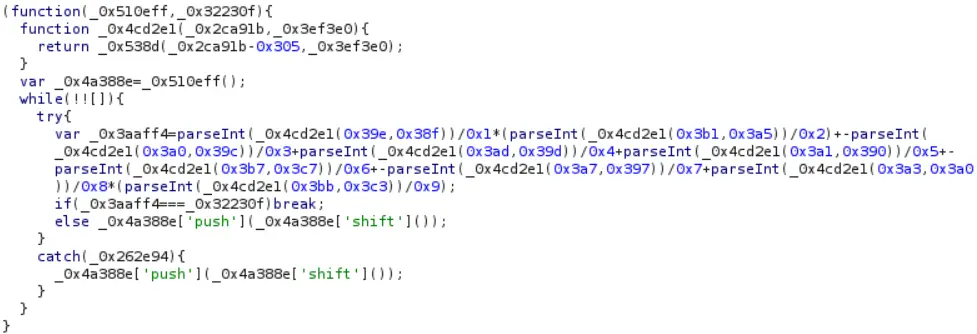
Initially, the array is randomly rotated, and its items are intentionally placed in the wrong order. To make the code work, the array must be rotated so that items are in their correct positions. While loop that performs mathematical calculations continuously rotates the array moving the first item to the end until the result of those calculations matches a specific value. The original code of that mathematical operations is:
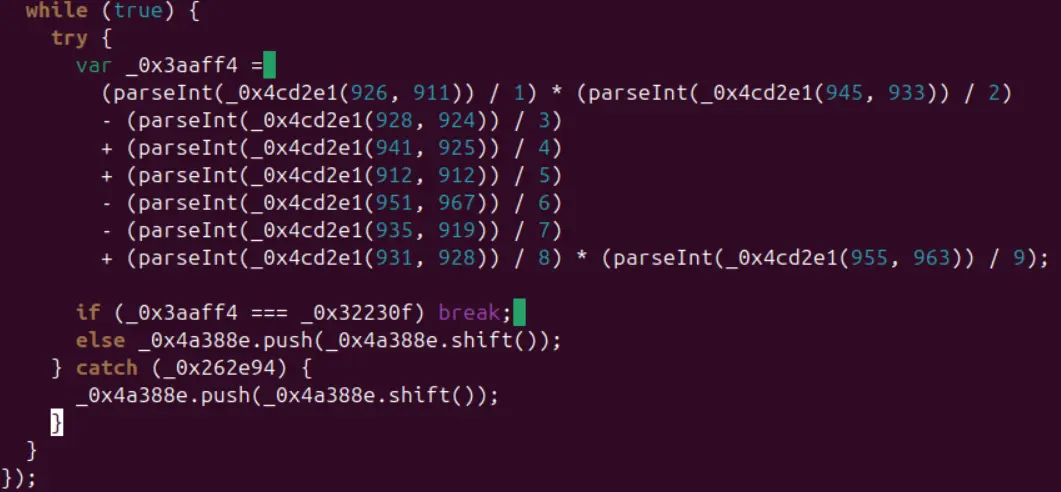
Decoded version:
-
_0x4cd2e1 - is a function that calls several other functions, and returns an item from an array based on a calculated index. To find the index, it subtracts 773 from the first parameter. For example in the first line:
926 - 773 = 153. So the index 153 is accessed. Interestingly there are only around 35 items in the array. To handle this, array goes through the list 4 times to get the item with index 13 (35 + 35 + 35 + 35 + 13 = 153).
-
After the calculations are made, the result is compared to the variable _0x32230f - which holds a decimal number - 238,785.
-
If the result of the calculation matches 238,785 - code moves to the next step. If not, the array is rotated, the first item is moved to the end, and calculation repeats.
Now the array is in the correct order and code can request any item from it. To set a contents of the page it uses function:

After placing array in the correct order and retrieving items with those indexes we get:
document[write](unescape({HTML of the page}));Second Layer
After we find the real index of HTML and the way it was used we can explore it a bit more. First, we decode hex values. The result after decoding hex values:
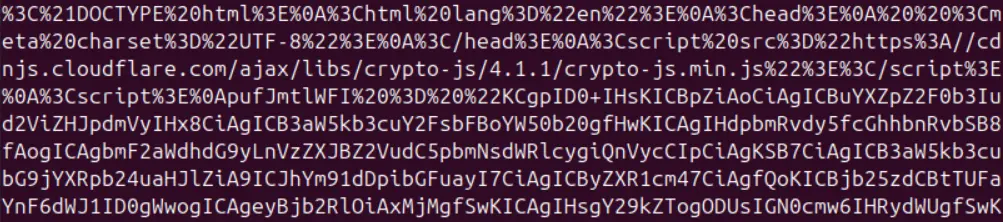
Then we URL decode it:
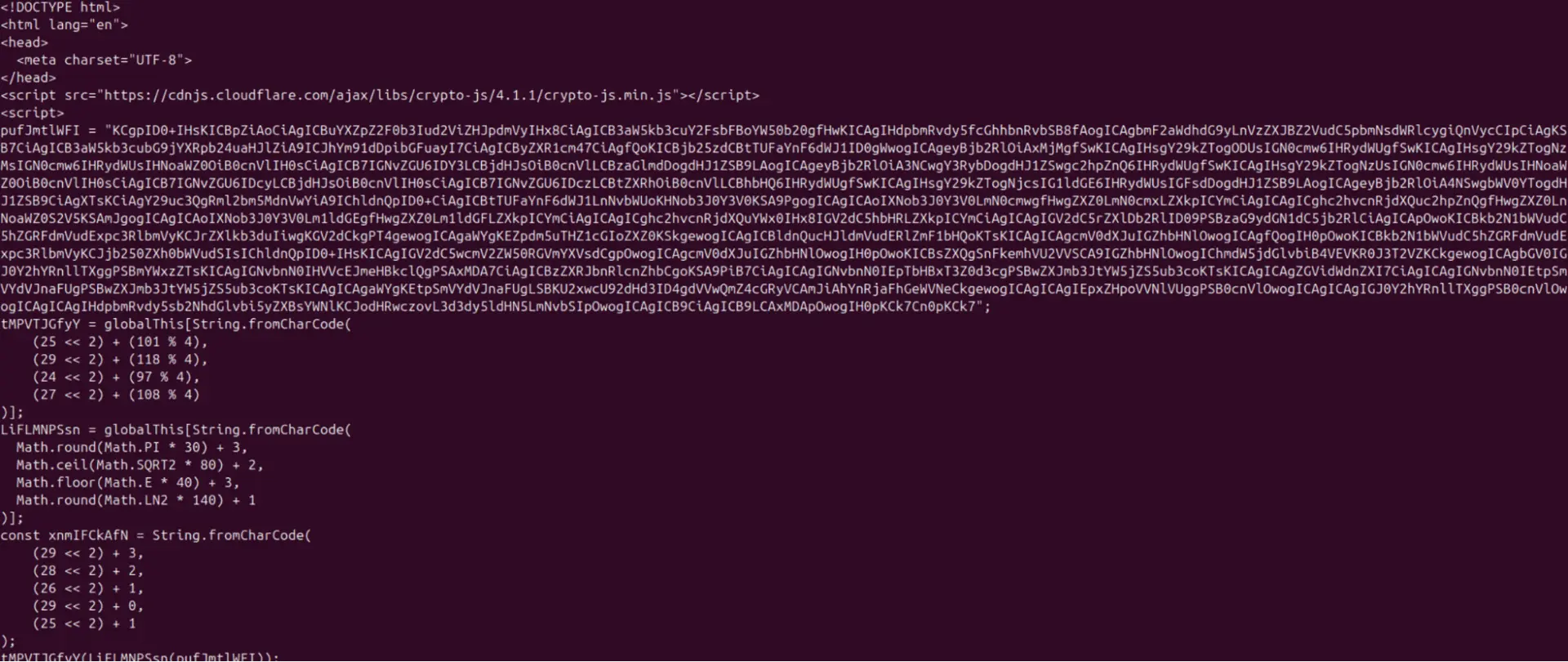
Now we can see the structure, some parts are encoded using CryptoJS library, some parts are just Base64 encoded. The obfuscation techniques are still present including:
- Web-scrapping protection:
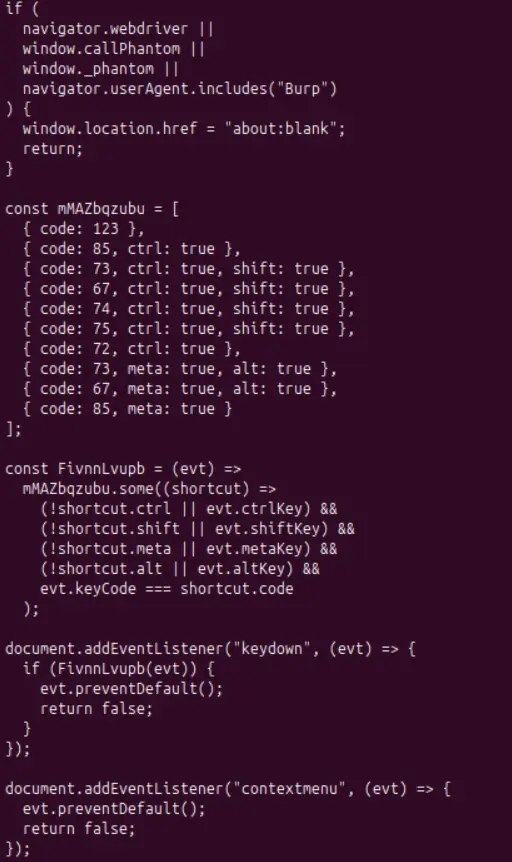
The code is a bit longer than shown, but the idea is that if one of those parameters is met or the debugger is opened for longer than 100ms it will redirect the user to etsy.com. On some other websites, we have seen redirections to alibaba.com, for example.
- There are some variables that are using the fromCharCode method to decode the words after some mathematical operations. There is no need in that other than to obfuscate the activity.
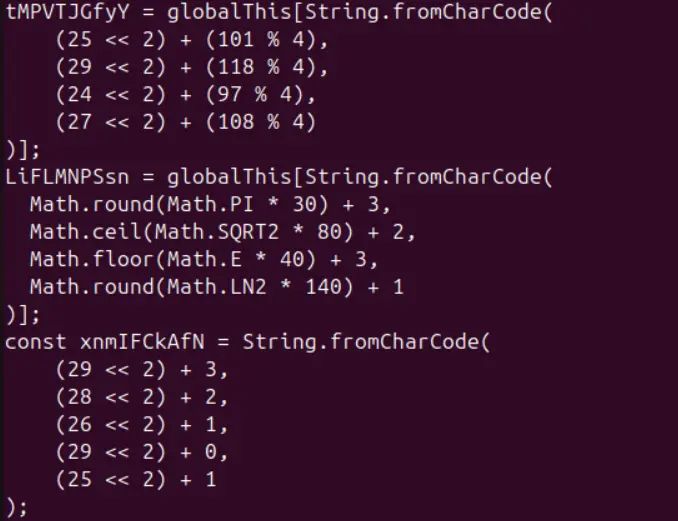
After decoding we get:
tMPVTJGfyY = globalThis[“eval”]; - function that will allow to run the script in the future
LiFLMNPSsn = globalThis[“asob”]; - accessing something called asob in the code
xnmIFCkAfN = “write”
Those are just parts of some other functions
- The next layer is encrypted using the CryptoJS library, but at the bottom we can find the key and initialization vector to decrypt it . Decryption algorithm:
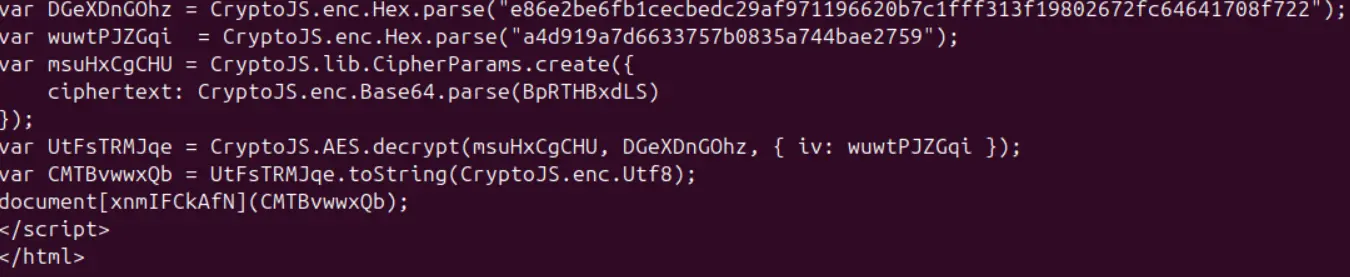
After the string was decrypted, new HTML is written with - document[write]({decrypted HTML})
Third Layer
At this layer, we finally see standard HTML elements, CSS, and of course one more web scrapping protection. Page begins by building the skeleton: divs, buttons, images or other elements. They are loaded from trusted sources like aadcdn.msauth.net, Github, Cloudflare, and others that are also commonly used by Microsoft. However, at the bottom of the page there is a large